Set it
The same settings apply to both apps and sync between them. They apply to every day, so there is no separate shape for a weekend.
On the Mac
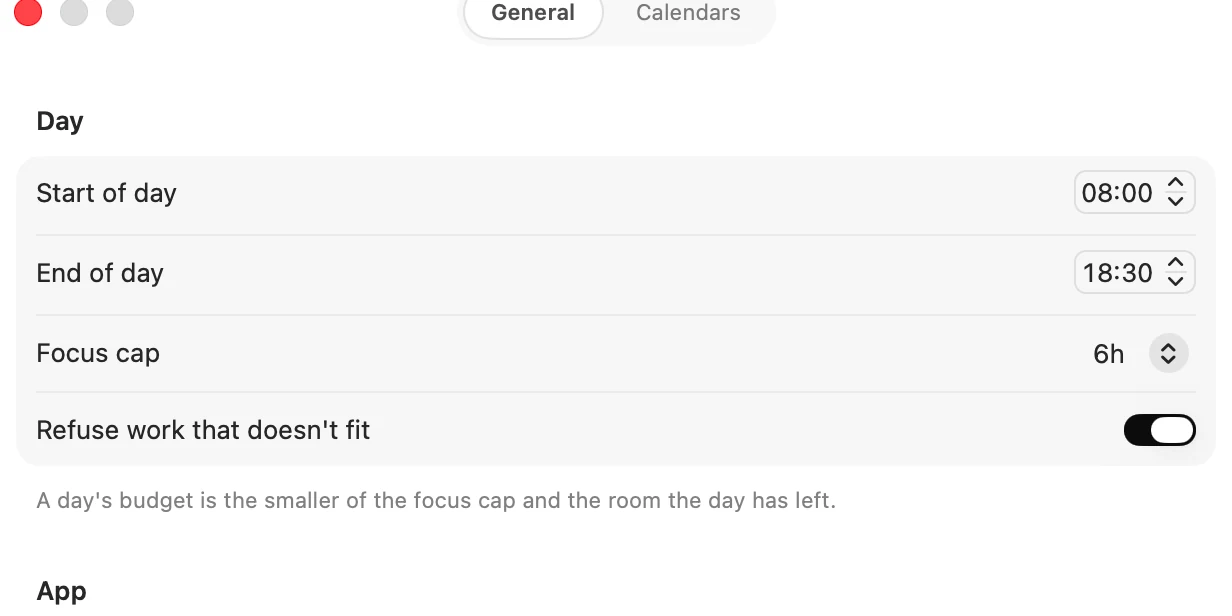
Open Settings ▸ General with ⌘, and use the Day group: Start of day, End of day, Focus cap and Refuse work that doesn't fit.
You can also change the hours from Calendar. Click the time range at the top of the page, such as 08:00 – 18:30. It is the same setting.
On the iPhone
Tap the circle beside the tab bar, then More, then Settings, and use the Day group: Start, End, Focus cap and Refuse work that doesn't fit today.
What each one does
- Start and end of day. 8:00 to 20:00 unless you change them. Matter places tasks only inside these hours, and Calendar shades the rest. They stay at least 15 minutes apart. Loafy's day runs on them too.
- Focus cap. The most planned work one day holds, 6h unless you change it. The Mac offers 1h to 12h, and the iPhone steps from 30m to 12h in half hours.
- Refuse work that doesn't fit. Whether a full today stops you saving or only tells you. See Avoid overplanning.
How they make a budget
A day's budget is the smaller of your focus cap and the room the day has. Room is the time inside your hours, less any events from calendars you haven't set to Treat as tasks. All-day events take no room.
On today, room is measured from now, because the morning you have already had is gone. On a coming day it is the whole window.
With a day from 8:00 to 18:30, a 6h cap and an empty calendar:
- At 9:41, the room is 8h 49m, so the budget is the cap, 6h.
- At 15:00, the room is 3h 30m, so the budget is 3h 30m.
- With 5h planned at 15:00, the day reads 1h 30m over.
Planned work is your open tasks, events from calendars set to Treat as tasks, and what your templates will add. See Upcoming capacity.
When you change it
The day's reading changes straight away. Tasks already placed stay where they are until the day is next laid out.
A task pinned outside your hours stays there and still counts toward the day.
Matter
To-do list that fits life
For the Mac and iPhone. It works offline, with no account.
Download for MacDownload for iPhone