When a task doesn't fit today
A task fits when its estimate is no more than what today has free. How much is free comes from your day's shape and what is already planned.
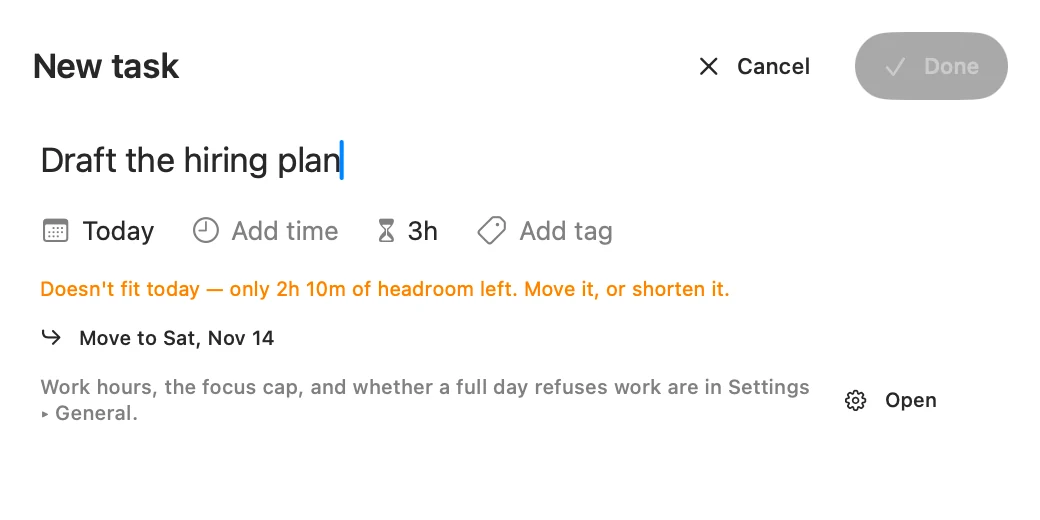
When it is more, the editor says Doesn't fit today under the day, with how much is left. Nothing else on the day moves to make room. You have three ways out:
- Move it. The Move to button names the soonest day with room, such as Move to Sat, Nov 14. It changes the day in the editor, and you still press Done or Save.
- Shorten it. Pick a smaller estimate. The note goes as soon as the task fits.
- Pick another day. Any day other than today is fine.
Refuse or only warn
Refuse work that doesn't fit is on unless you turn it off. It is in the same place as your day's hours, and it applies on both apps.
- On, Done or Save stays grey until the task fits.
- Off, you see the same note and the same Move to, but you can still save. The day goes over, and its reading says by how much, in orange.
Turn it off if you would rather record what a task will really take, even when the day can't hold it.
What is never refused
The refusal only applies to saving a task on today that asks for more than today has.
- Any other day. A coming day never refuses, even one already over. Upcoming shows how it stands.
- An edit that doesn't ask for more. On a full day you can still rename a task that is already on today, shorten it, or change its tags. You see the note, and you can save.
- A finished task. Editing one is never refused.
- Template tasks. A recurring task always lands on its day, full or not.
- Calendar events. They arrive whatever the day holds. Events from a feed set to Treat as tasks then count toward the day.
- Reopening or restoring a task. It comes back to its day even if that puts the day over.
- The Mac's menu bar panel. Its quick add never throws away what you typed. The task is added, the panel says Added, but it doesn't fit today, and it offers Move to.
Cases you may run into
- Late in the day. Today's room is measured from now, so it shrinks as the day goes on. Once End of day has passed there is no room left, and with refusing on, a new task can't go on today. Move to takes it to the next day with room.
- A task longer than your focus cap. An 8h task with a 6h cap fits no day. Move to offers tomorrow, which takes it because coming days never refuse. That day then reads as over.
- No room for 60 days. Matter looks 60 days ahead. If none of them has room, Move to offers tomorrow.
- Work carried over. Open tasks from earlier days count toward today, so they use up today's room. Finishing or pushing them gives it back.
- Time already tracked. Tracked time comes off what a task still needs, so a session in progress leaves more room. See Sessions.
Try it
Nothing you type here is kept.
2h 10m free
Matter
To-do list that fits life
For the Mac and iPhone. It works offline, with no account.
Download for MacDownload for iPhone