Add a date
Type @ at the start of a line, or after a space. An @ right after other characters, as in an email address, opens nothing.
A list opens with the date your words make, if they make one. Today, Tomorrow, Yesterday and Now come after it, narrowing as you type, and notes come last.
- On the Mac, use ↑ and ↓ to move through the list, and press Return or click to pick. Esc closes the list and leaves what you typed.
- On the iPhone, tap a row. The @ button in the bar above the keyboard types the
@for you, with a space first if the caret is right after a word.
What you can type after @
- A name:
today,tomorrow,yesterdayornow - A weekday:
fridayorfri, for the next one. Today's own weekday means a week from today. - A month and day:
aug 5oraugust 5, this year - Numbers, month first:
8/5for this year, or8/5/2026 - Year first:
2026-08-05 - A time:
3pm,3:30pmor15:30, for today at that time - A date and a time:
aug 5 3:30pmorfriday 3pm
While your words don't make a date yet, the Mac says Type a date or a note's name, unless a note matches. The iPhone shows no list until something matches.
What a date shows
A date mention holds a fixed day, or a fixed moment if it has a time. Picking Today stores today's date. What it says then depends on the day you read it:
- Today, Tomorrow or Yesterday
- The weekday's name, for up to six days ahead
- Last and the weekday's name, for up to six days back
- The date itself, such as Nov 5, 2026, further away
Written on a Tuesday, it says Today that day, Yesterday on Wednesday and Last Tuesday by Thursday. A date with a time shows the time after it. Now stores the moment you picked it, with the time.
A date mention doesn't make a task or a reminder, and it doesn't show on the calendar.
Link to another note
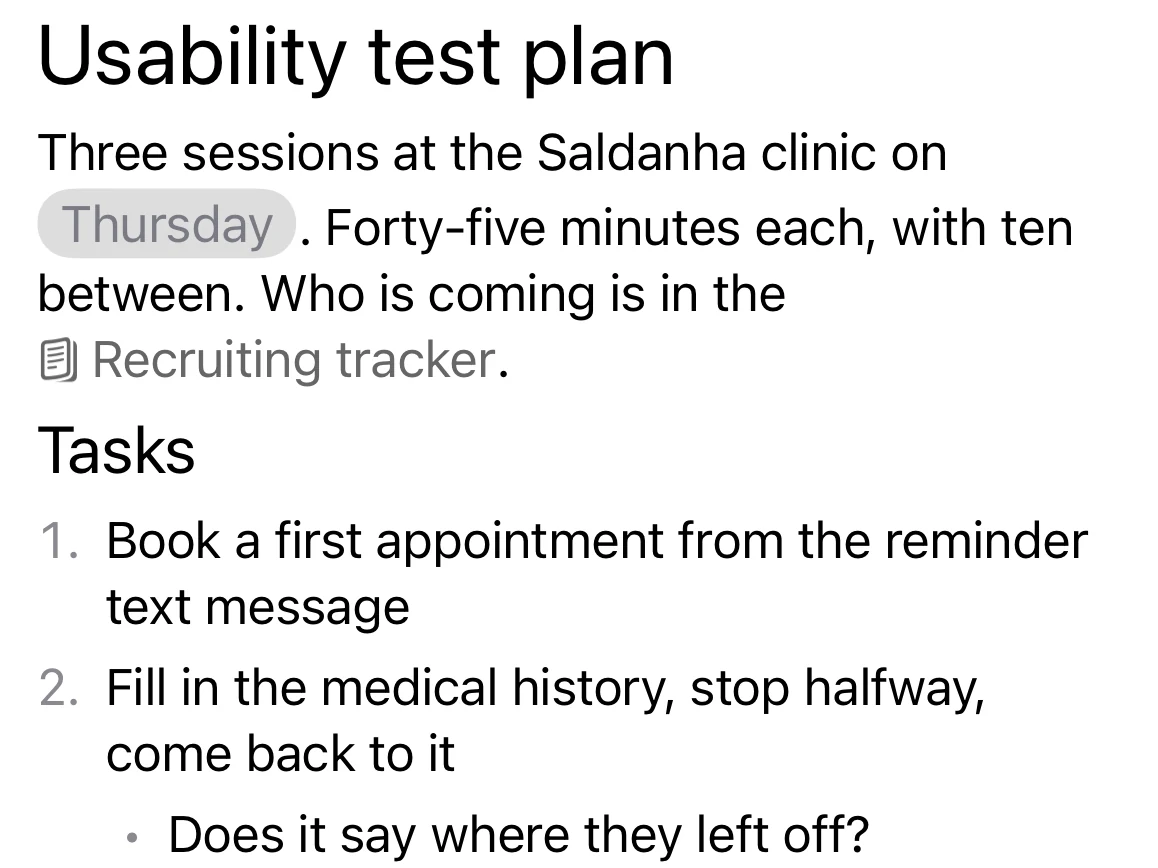
Type [[ to list notes only, or @ to see them under the dates. [[ opens in the same places @ does.
The list shows up to five notes, the most recently edited first. Typing narrows it: titles that start with your words come first, then titles that contain them. Case and accents don't matter. The note you are in isn't offered. On the Mac, a [[ with no matches says No notes match.
Pick one the way you pick a date. The link shows the other note's title in grey, with a small book before it.
The link shows the title as it is when the note holding it opens. After you rename a note, links to it show the new title the next time their note opens.
Open a link to a note
On the Mac
A click shows a card with the note's title, Open and Remove. ⌘-click opens the note straight away. ⌘K with the caret on the link shows the card too.
After you follow a link, Back appears at the start of the toolbar and steps back through the links you followed. Picking a note in the list clears it.
On the iPhone
A tap shows Open and Remove. Open takes you to the note on the Notes tab, from any page. The Link button in the Format bar shows the same menu when the caret is on the link.
When the note is gone
If the other note has been deleted, the link keeps the words it had. The card or menu says Couldn't load and offers Remove. Remove turns any link to a note into ordinary words.
How a mention behaves
- The caret can't stop inside one. One press of Backspace removes it whole.
- Return keeps it whole. It stays on one side of the split.
- Formatting passes it by. Bold, italic and the rest don't change a mention that sits among the words you format.
- Copying keeps it inside Matter. Pasted into another note, it is still a mention. Other apps get its words: the date as it reads now, or the note's title.
- Find in a note skips it. Find doesn't look inside mentions. The search over the note list does read them, as they read when the note was last saved.
In a title
On the Mac a note's title takes @ for dates, with no notes in its list and no [[. On the iPhone a title is plain text, so renaming a note there drops any mention in its title.
Mentions work in the Journal and the Pin board as they do in a note.
Matter
To-do list that fits life
For the Mac and iPhone. It works offline, with no account.
Download for MacDownload for iPhone